
Bulk Editing Records
Start with an Export
- The easiest way to edit records in bulk is to use a CSV template already populated with the records you wish to edit.
- In order to generate a pre-populated CSV template via bulk export, follow these bulk export instructions.
Clean up, Edit the Template, and Run a New Import
-
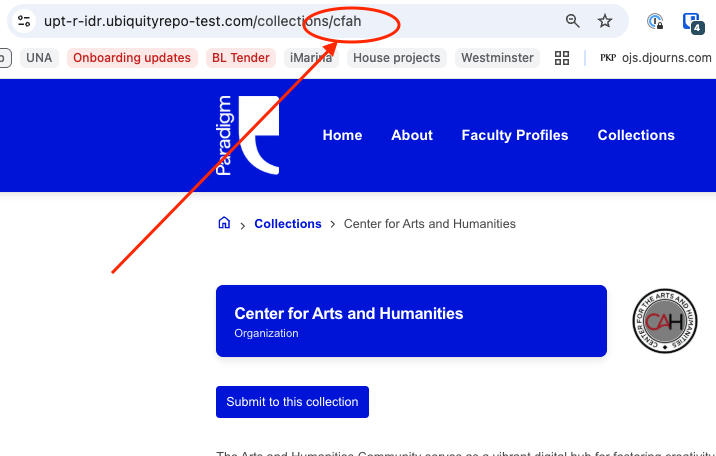
In order to use the CSV export template in the bulk importer, you will need to add and populate a "communities" column (Note: communities is the system term for "collections." In the CSV, these should be identified by their unique identifier as opposed to their full name. The unique identifier can be found by visiting the collection and looking at the last section of URL, e.g.:
- You will also need to remove two columns (rights.title and rights.description).
- Once these steps are complete, your CSV template is ready for any additional edits you wish to make to the metadata for the records within.
- Removing metadata from cells will delete that metadata from the record
- Adding additional metadata to cells will add that metadata to the record
- Leaving metadata unchanged in the template will result in no change to the record
- Editing files requires the addition of a column (filenames). Adding new files will create a new version of the record. To add files to a record while preserving previous files as part of the new version, include both filenames with the record, as well as both files in the importer.
- You can now import the CSV template to the bulk importer, following the steps outlined in this article.