
Formatting Your Bulk CSV
For best results, we recommend using Google Sheets to format, edit, and save your CSV files.
What is the CSV?
- The CSV is a set of comma separated values that displays as a spreadsheet. Each column in the spreadsheet captures a specific piece of metadata to be validated and imported by the repository bulk importer tool. The first row of the spreadsheet includes the titles of these columns:

- Each row in the CSV represents a single metadata record:

- In cases where a field can contain multiple entries (e.g., the creator fields), each entry should be separated by a soft carriage return (CMD+Alt+Enter on Macs, Shift+Enter on PCs). Multiple field entries should be aligned with corresponding metadata across columns, viz.:

Important: CSVs should be formatted as plain text. This is especially important for dates, which should follow the YYYY-MM-DD configuration. Note that MS Excel often automatically reformats dates, which will lead to validation errors in bulk import.
Important: Watch out for non-ASCII characters in text that has been copied and pasted from another source. The bulk uploader cannot process non-ASCII characters, and they will interrupt normal validation processes (without an error). You can check your text for non-ASCII characters here: https://pages.cs.wisc.edu/~markm/ascii.html
Required Fields
- The repository metadata schema is based on the DataCite schema, and therefore includes the same required fields. If any of these fields are left empty, validation will fail:
- resource_type.id (column C)
- creators.type (column D)
- creators.given_name (column E)
- creators.family_name (column F)
- title (column O)
- publication_date (column Q)
- description (column R)
- version (column AK)
-
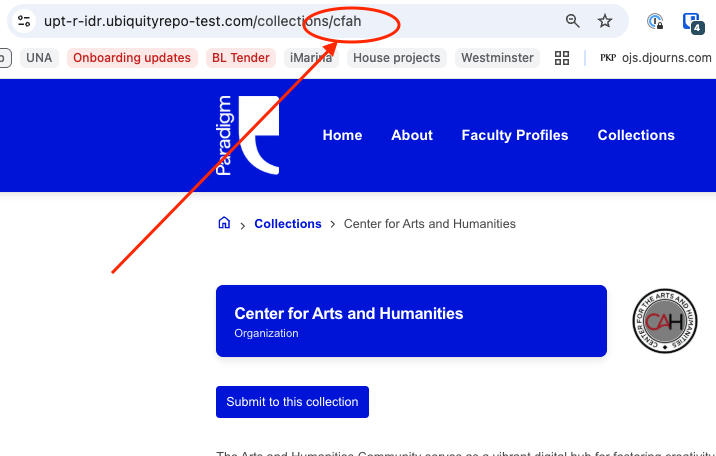
communities (column AT) (Note: communities is the system term for "collections." In the CSV, these should be identified by their unique identifier as opposed to their full name. The unique identifier can be found by visiting the collection and looking at the last section of URL, e.g.:
Files
- For records to be paired with files, two options exist:
- harvesting the file from an openly accessible URL on the internet
- uploading the file from your hard drive to the bulk importer tool during the process of creating a new bulk import task
- In either case, the file should be linked to its corresponding metadata record by being identified in the spreadsheet's first column (filenames [column A]).
- If the file should be harvested from an openly accessible URL on the internet, the full URL should be included in column A:

- If the file is being uploaded to the bulk importer tool, the exact filename (including extension) should be included in column A:

Fields with Controlled Vocabularies
- For many fields in the metadata schema, the validator will only accept a specific set of terms. A list of these fields and the acceptable terms may be accessed here.